How to compile PostGIS 2.1 on Ubuntu Server 12.04+
PostGIS 2 has some exciting new goodies — including raster support — that I’m keen to use in the analysis of Mappiness data.
But the PostGIS package provided by Ubuntu 12.04 is still only at version 1.5, and the GEOS and GDAL packages are also too old to support the new version.
So — this is how I compiled PostGIS 2.0.1 2.0.3 2.1.0rc2 2.1.0 and its dependencies on my GIS server.
Spindlytext: write in the sky with the Google Earth API
I’ve just released Spindlytext on Github. It’s the library that powers the live data display in Pigeon Sim, by creating KML linestrings in the shape of letters.
A depthcam? A webkinect? Introducing a new kind of webcam
Update, 10 February: Sorry for some serious reliability issues over the last few days. The streaming server is now hosted in-house at CASA, which should be a lot more robust.
At CASA we’ve been looking at using a Kinect or three in our forthcoming ANALOGIES (Analogues of Cities) conference + exhibition.
We’ve been inspired in part by Ruairi Glynn‘s amazing work here at UCL, and Martin has been happily experimenting with the OpenKinect bindings for Processing.
Meanwhile, I recently got to grips with the excellent Three.js, which makes WebGL — aka 3D graphics in modern browsers — as easy as falling off a log. I’m also a big fan of making things accessible over the web. And so I began to investigate prospects for working with Kinect data in HTML5.
There’s DepthJS, an extension for Chrome and Safari, but this requires a locally-connected Kinect and isn’t very clear on Windows support. There’s also Intrael, which serves the depth data as JPEG files and provides some simple scene recognition output as JSON. But it’s closed-source and not terribly flexible.
The depthcam
So I decided to roll my own. I give you: the depthcam!
Polygons from PostGIS to Processing
There are plenty of ways to get spatial data from a PostGIS database into a Processing sketch.
You can export to CSV or SVG and load it from there; you can query the database directly; or, depending on context, you might choose to generate Processing commands directly, which is the route I went to display a background map of the UK in a recent visualization project.
Passcode view controller
Need to protect something with a passcode in an iPhone app you’re developing?
Then you may find my MIT-licensed passcode view controller — as seen in the mappiness app and in the short screencast below — of use.
See Github for the code and (scant) documentation.
Approximating kernel-weighted proportions in PostGIS
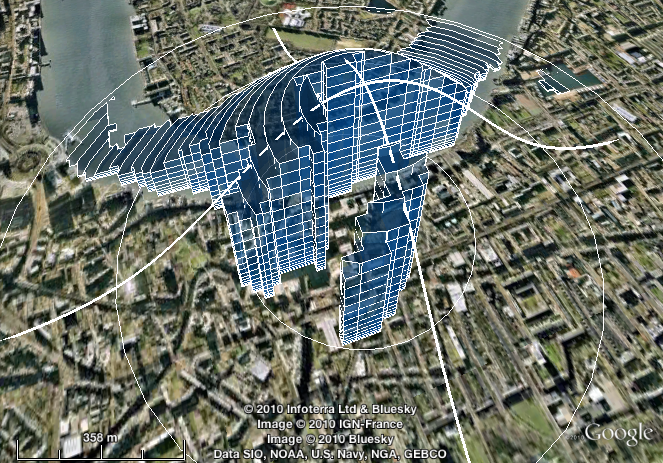
Imagine you want compare various locations in terms of the availability of a certain type of environment, such as fresh water.
You might want to use a measure of the proximity of that environment — such as the nearest neighbour distance.
You might want to use a measure of the quantity of that environment in the vicinity — such as the proportion of land within a specific radius that is of that type.
Or you might ideally like a measure that combines both of these: one that incorporates the quantity of that environment, but gives greater weight to areas that are nearer, and lesser weight to those that are further away.
In that third case, what you probably want is a kernel-weighted proportion.
MySQL gem for Ruby 1.9.x on Snow Leopard or Lion (Mac OS X 10.6 or 10.7)
Updated May 2012 for Lion
The secret to getting the MySQL gem to install and function with Ruby 1.9.x on Snow Leopard or Lion is:
- Install MySQL using the 64-bit .DMG package installer from dev.mysql.com
- Install Ruby using RVM or (preferably) rbenv
- Add these to lines to
~/.bash_loginor~/.bashrcor~/.profileas appropriate:
export PATH="/usr/local/mysql/bin:$PATH" export DYLD_LIBRARY_PATH="/usr/local/mysql/lib:$DYLD_LIBRARY_PATH" |
- In a new shell (Terminal window), type
gem install mysqlas normal.
I’m posting this mainly as a record for myself, having wasted a lot of time in the past trying strange incantations from comments on various other blogs posts.
Overlapping markers on your Google Map? Meet OverlappingMarkerSpiderfier
Ever noticed how, in Google Earth, marker pins that overlap each other spring apart gracefully when you click them, so you can pick the one you meant?
And ever noticed how, when using the Google Maps API, the exact same thing doesn’t happen?
This code makes Google Maps API version 3 map markers behave in that Google Earth way. Small numbers of markers (up to 8, configurable) spiderfy into a circle. Larger numbers fan out into a (more space-efficient) spiral.
Bread
This post from 2011 has been updated several times, most recently in January 2021.
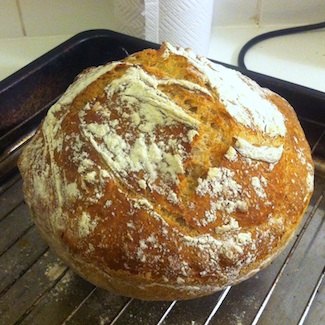
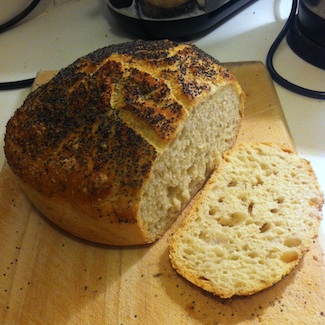
This recipe makes wonderful bread: crusty, open-textured, moist, and good-looking.
It’s based on Jim Lahey’s recipe from the New York Times in 2006 (also the subject of an article and accompanying video, and now a full-length book). But it’s easier than that one: there’s less faffing, and no silly middle stage with linen cloths.
In the ten years since I started using the recipe, I’ve baked most of our family’s bread. As my sister-in-law recently remarked, it makes normal bread recipes look like some weird conspiracy: why would you tell people to make all the effort and mess involved in kneading, when a bit of stirring turns out just as well?
Simple PostGIS nearest neighbour function
Here’s a less generic and slightly different nearest-neighbour function based on Regina’s generic nearest-neighbour function at Boston GIS.
It follows the same basic idea of using series of enlarging search radii to restrict distance calculations to a manageable subset of things-that-might-be-near. The difference is that it uses a geometric progression of sizes (x, x * y, x * y^2, x * y^3, ...) instead of an arithmetic one (x, x + y, x + 2y, x + 3y, ...).
For some distributions of things-that-might-be-near, and tuned with the right parameters (x, y), this turns out substantially faster (I’ve used it to locate the nearest UK postcode to each mappiness response).