O2 mobile broadband on a Mac: tips for you, suggestion for O2
Until Monday, O2 is offering a half-price USB dongle for pay-as-you-go mobile broadband. Buy it via Quidco, and you get not only the dongle but also a month’s access (or 3GB, whichever is the sooner) absolutely free.
So: free modem. No further commitment. And the opportunity to buy access a day at a time for £2, on a train journey, for example, or in an airport lounge, where the cheapest paid-for WiFi option is rarely less than £5, and often nearer £10. Handy.
Update. O2 is no longer doing the modem at half price, but the Quidco cashback has increased so that it still fully covers the modem and a £15 top-up.
The dongle
The dongle, a Huawei E160, is a fairly pretty white thing, and it supports my Mac. So far so good. Unfortunately, the software and instructions have crack-smoking hobos written all over them. Huawei “Mobile Connect” is ugly, crash-prone, writes logs to the console like there’s no tomorrow (literally thousands of messages per minute), and has never yet successfully connected me.
Luckily, you don’t need to use Mobile Connect: once the drivers are installed, you can connect using the menu item for the modem. Or rather, once the drivers are installed and you’ve taken the following counter-intuitive and undocumented step you can.
Making it work
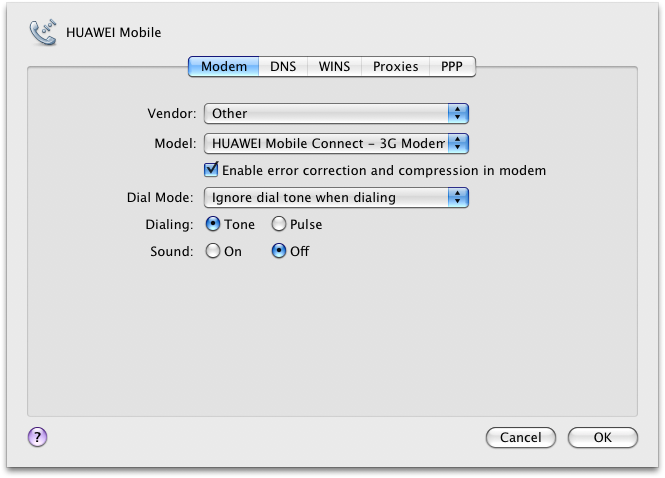
When it installed, my dongle was configured as Vendor: Other, Model: Huawei Mobile Connect – 3G modem (this is under System Preferences > Network > HUAWEI mobile > Advanced…). This sounds good, but it doesn’t work: there’s nowhere to enter your APN.
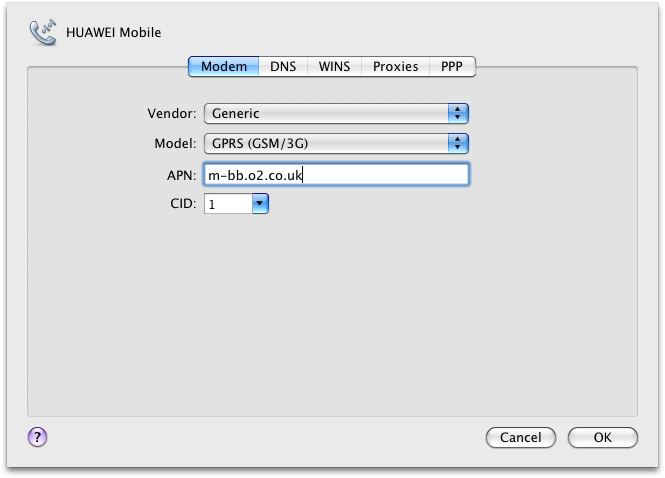
Instead, after much fiddling, I found I had to switch Vendor to Generic and Model to GPRS (GSM/3G). Although confusingly less right, this does seem to do the trick.
I also ended up downloading new drivers from the Huawei site. (Not for the E160. That would be too simple. The ‘Mac’ drivers for the E160 turn out to be a Windows .exe file. The drivers I’m using are supposedly for the E220). I’m not sure if this step was necessary or even well-advised, but it might be worth trying if you’re not having any luck.
Listen up, O2
Which brings us to the suggestion to O2. O2: I have an iPhone. It’s on your network. It supports tethering. I’m not about to pay you an extra £15 a month for the once or twice a month I want to use it. Let me use it for pay-as-you-go mobile broadband!
In this case you’d have saved yourself the full cost of a modem dongle — and generally, you’d be saving yourself the support costs and return costs associated with everyone who can’t get the horrible thing working. You’d have saved the world the cost of the resources and pollution required in manufacturing it. And you’d have saved me the pain of several hours fiddling with System Preferences, the inconvenience of another gadget to pack for every trip, and probable future kernel panics associated with Huawei’s flaky drivers.
-
Trev
-
Anthony
-
Natalie
-
Siddif
-
Hannah
-
Moethejoey
-
Colin Veysey
-
Ben
-
Charles
-
miserable but mobile
-
miserable but mobile
-
vintage fan
-
steve
-
anish
-
Gary
-
Mobile Marketer
-
BroadbandBlogger